Crawl errors are the quiet killers of organic traffic. A page that search engines cannot crawl will never rank, no matter how good it is. The frustrating part is that these errors are usually invisible — your site looks perfectly fine to visitors while bots are bouncing off broken URLs in the background.
Google Search Console is the free tool that surfaces these problems, and learning to read it is one of the highest-leverage skills in SEO. Over the years I have used the Pages report to recover sites that had silently lost large chunks of their index. This guide explains what each crawl error means and exactly how to fix it. It complements our broader guide to search performance.
What Crawl Errors Actually Are
A crawl error happens when a search engine bot tries to reach a URL and something goes wrong. Maybe the page returns a 404, maybe the server times out, maybe a redirect loops back on itself. Each error is a dead end that wastes crawl budget and can pull a page out of the index.
Google Search Console groups these problems in the Pages report (formerly the Index Coverage report). It splits your URLs into two buckets: pages that are indexed, and pages that are not — with a reason for every exclusion. The reasons are where your work is.
Site Errors vs URL Errors
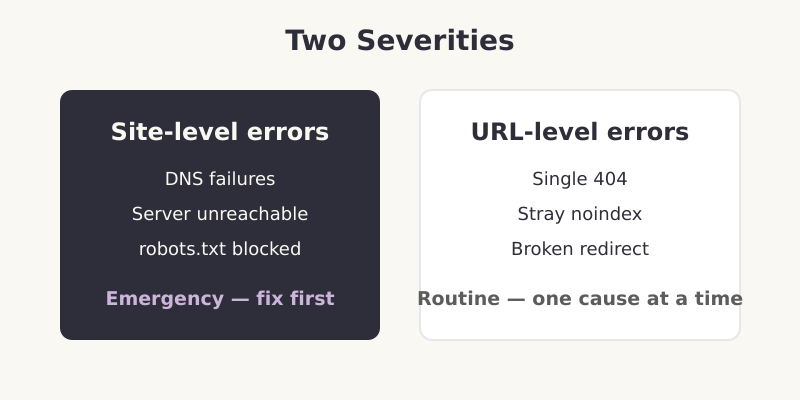
Before diving into specific fixes, understand the two severities you will encounter. They demand very different responses.
- Site-level errors affect your whole domain — DNS failures, server connectivity problems, or a robots.txt that bots cannot fetch. These are emergencies. If Google cannot reach your server, nothing else matters
- URL-level errors affect individual pages — a single 404, a wrongly applied noindex, a redirect that points somewhere broken. These are common, expected, and fixed one cause at a time
Pro Tip: When you log into Search Console after a redesign or migration, check site-level health first. I once spent an hour analysing individual 404s before realising the real problem was a server configuration change blocking the bot at the door. Always confirm the front door is open before you inspect the rooms.
The Most Common Crawl Errors and Their Fixes
404 — Not Found
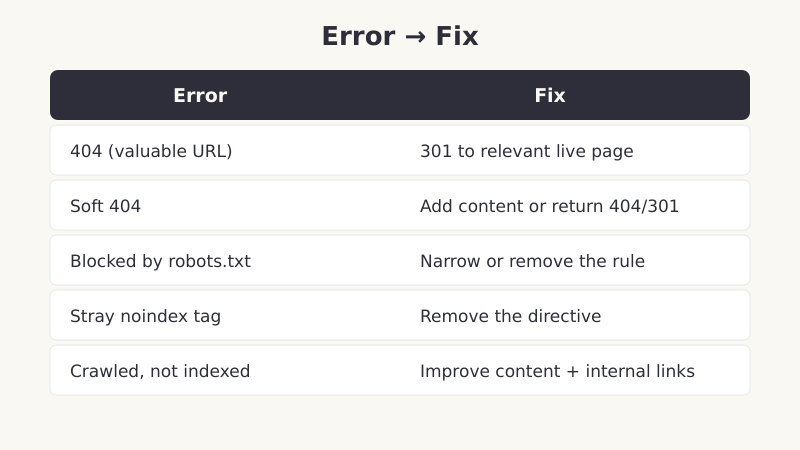
The bot requested a URL that no longer exists. A few 404s are normal — pages get deleted. The problem is 404s on URLs that still have value: pages with backlinks, internal links, or old rankings. For those, set up a 301 redirect to the most relevant live page so you preserve the link equity. Never leave a valuable URL returning a bare 404.
Soft 404
This is sneakier. The page returns a 200 “OK” status, but the content says “nothing here” — an empty category, a thin search results page, or a “product unavailable” message. Google flags it as a soft 404 because the experience is a dead end. Either restore real content to the page or return a proper 404 or 301, so your status code matches reality.
Server Error (5xx)
The server failed to respond properly — a 500 internal error or a 503 timeout. Occasional 5xx errors during traffic spikes are tolerable, but a pattern signals a hosting or application problem. Check server resources, error logs, and any plugins or scripts that might be timing out. Persistent 5xx errors will erode your index fast.
Blocked by robots.txt
The page is being intentionally blocked by a rule in your robots.txt file. Sometimes that is correct — you do not want admin pages crawled. But often a too-broad rule blocks pages you actually want indexed. Open your robots.txt, find the offending Disallow line, and narrow or remove it. This is one of the most common self-inflicted wounds I find on audits.
Excluded by noindex Tag
The page carries a noindex directive in its HTML or HTTP header, telling search engines to keep it out of the index. If the page should rank, remove the tag. These directives love to survive site migrations and staging pushes — always sweep for stray noindex tags after any major change.
Crawled — Currently Not Indexed
Google crawled the page but chose not to index it. There is no technical block — this is a quality judgment. It usually means the content is thin, duplicative, or simply not distinctive enough to earn a place. The fix is editorial, not technical: improve the page, differentiate it, and strengthen its internal links so it signals importance.
A Repeatable Process for Fixing Crawl Errors
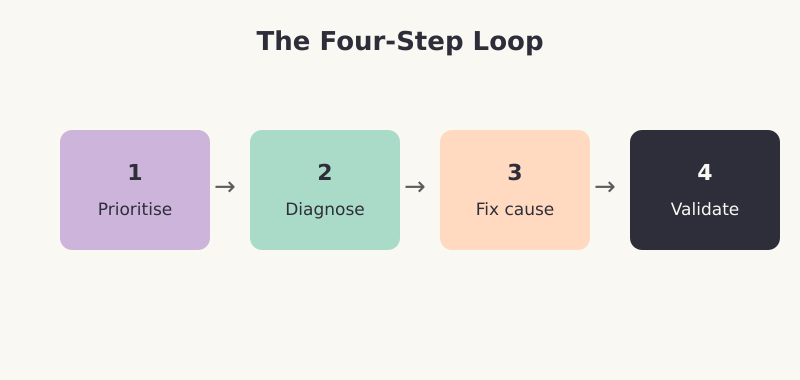
Random clicking through Search Console wastes time. I work through the same four-step loop every time, and it scales from a tiny blog to a site with millions of URLs.
- Prioritise by impact — fix errors affecting valuable, high-traffic pages first. A 404 on a forgotten tag archive can wait; a 404 on a top landing page cannot
- Diagnose the root cause — use the URL Inspection tool to see exactly how Google views the page. Do not guess at the reason; confirm it
- Fix the cause, not the symptom — if a CMS setting generates a class of errors, change the setting once rather than patching each URL
- Validate and verify — after fixing, click “Validate Fix” in Search Console and re-inspect the URL to confirm the change took effect
How to Prevent Crawl Errors
Fixing errors is reactive. Preventing them is where mature SEO operations spend their time. A few habits keep the error count low.
- Redirect on every deletion — make a 301 to a relevant page part of your delete workflow, so you never strand a valuable URL
- Keep the sitemap clean — it should list only canonical, indexable, 200-status URLs, and update automatically
- Audit before and after big changes — migrations and redesigns are the leading cause of crawl errors. Inspect a sample of URLs immediately afterward
- Check Search Console monthly — a quick monthly review of the Pages report catches problems while they are small
Frequently Asked Questions
Where do I find crawl errors in Google Search Console?
Open the Pages report under the Indexing section in the left sidebar. It shows how many URLs are indexed and lists every reason a URL was not indexed, grouped by issue. Click any reason to see the affected URLs and inspect them individually with the URL Inspection tool.
Are crawl errors bad for SEO?
It depends on the error and the page. A 404 on a deleted, low-value page is harmless and normal. A 404 on a page with backlinks or rankings costs you traffic and link equity. Site-level errors that block crawling are serious and need immediate attention. Prioritise by the value of the affected pages, not by the raw error count.
What is the difference between “Crawled — currently not indexed” and a crawl error?
A crawl error means a bot could not properly access the page — a technical failure. “Crawled — currently not indexed” means the bot accessed the page fine but decided not to index it, usually a content-quality judgment. The first is fixed technically; the second is fixed by improving the page and its internal links.
How long does it take for fixed crawl errors to clear?
After you fix an issue and click “Validate Fix,” Google re-checks the affected URLs over the following days to weeks, depending on your site’s crawl frequency. Smaller sites may wait longer because bots visit less often. You can speed recovery of important pages by requesting indexing through the URL Inspection tool.
Key Takeaways
Crawl errors silently drain organic traffic, and Google Search Console is your window into them. Learn to read the Pages report, distinguish site-level emergencies from routine URL errors, and match each error to its correct fix — a 301 for valuable 404s, a robots.txt edit for blocked pages, content work for “crawled but not indexed.” Then prevent recurrence by redirecting on every deletion and checking the report monthly. The habit pays for itself in traffic you never lose.