Email marketing automation is the closest thing marketing has to a printing press for revenue. You build a sequence once, and it works for every new subscriber, around the clock, without you lifting a finger. Done well, it turns a one-time visitor into a customer while you sleep. Done badly, it floods inboxes with irrelevant noise and trains people to ignore you.
I have built automation programs for everyone from solo founders to enterprise teams, and the gap between the two outcomes is rarely the software — it is the thinking behind the sequence. This guide covers the workflows that actually convert and how to set them up. It fits within the broader picture of a marketing technology stack.
What Email Marketing Automation Is
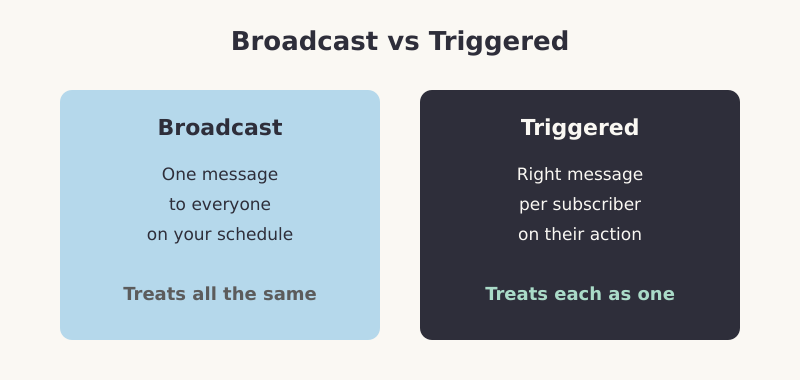
Email marketing automation sends the right message to the right person at the right time, triggered by their behaviour rather than your calendar. Instead of blasting one newsletter to your whole list, you build sequences that fire automatically when someone takes an action — signs up, abandons a cart, hits a milestone, or goes quiet.
The shift is from broadcasting to responding. A broadcast treats every subscriber identically. Automation treats each one as an individual on their own journey, and that relevance is exactly why automated emails consistently outperform one-off campaigns on open and click rates.
The Anatomy of an Automation Workflow
Every workflow, no matter how complex, is built from three parts. Understand these and you can design any sequence.
- Trigger — the event that starts the sequence. A new signup, a purchase, a page visit, a date, or a period of inactivity
- Conditions — the branching logic. “If they opened the last email, send A; if not, send B.” Conditions personalise the path
- Actions — what happens. Usually sending an email, but also waiting a set time, updating a tag, or moving the contact to another list
Pro Tip: Resist the urge to over-engineer your first workflow. The most common mistake I see is building a sprawling fifteen-branch monster that nobody can maintain or debug. Start with a simple linear sequence, watch how subscribers actually behave, then add branches only where the data shows you need them.
The Workflows That Actually Convert
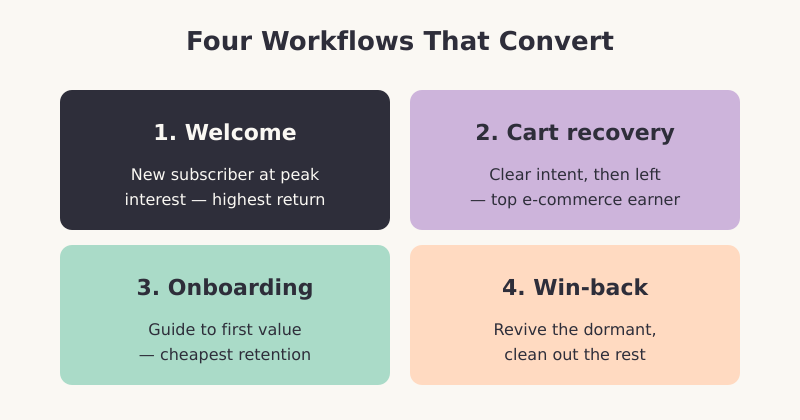
You do not need dozens of workflows. A handful of well-built ones cover the vast majority of the value. These are the four I set up first for almost any business.
1. The Welcome Sequence
This is the single highest-return automation you will build. New subscribers are at peak interest the moment they sign up — they just raised their hand. A welcome sequence of three to five emails introduces your brand, sets expectations, delivers a quick win, and gently moves toward the first conversion. Send the first email instantly; people expect it.
2. The Abandoned Cart (or Browse) Recovery
Someone showed clear intent — they added an item to their cart or browsed a key page — then left. A short recovery sequence reminds them, addresses likely objections, and offers help. For e-commerce, this is often the highest-revenue automation in the entire program. The first reminder should go out within a few hours, while intent is still warm.
3. The Onboarding Sequence
For software and subscription businesses, the period right after signup decides whether a customer sticks or churns. An onboarding sequence guides new users to their first moment of value — the action that makes the product “click.” Each email targets one step, removing friction and celebrating progress. Good onboarding is the cheapest retention you will ever buy.
4. The Re-Engagement (Win-Back) Sequence
Subscribers go quiet. A win-back sequence targets contacts who have not opened or clicked in a defined window, with a “we miss you” message, a compelling reason to return, and ultimately a clear “stay or go” choice. It revives a slice of dormant contacts and lets you cleanly remove the rest, which protects your deliverability.
How to Set Up Your First Workflow
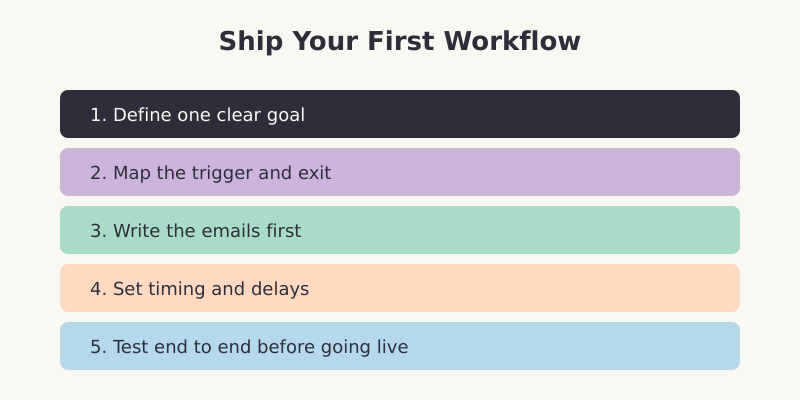
Theory is easy; the setup is where people stall. Here is the order I follow to ship a working welcome sequence without overthinking it.
- Define one clear goal — what should this sequence achieve? A first purchase, a profile completion, a booked demo. One goal per workflow
- Map the trigger and exit — decide exactly what starts the sequence and what removes someone from it (usually completing the goal)
- Write the emails first — draft the full sequence as plain text before touching the automation builder. Content before plumbing
- Set timing and delays — space emails to feel helpful, not pushy. Instant, then a day or two between the rest is a safe default
- Test end to end — sign up as a test subscriber and walk the entire path yourself before turning it live
Measuring and Improving Automation
Automation is never “set and forget.” The whole point is that you can measure it and improve it continuously, because it runs the same way every time. Track these and you will know what to fix.
- Open and click rates per email — they reveal which messages land and which get skipped, so you know where to rewrite
- Conversion rate of the whole sequence — the metric that matters most. Are subscribers reaching the goal you defined?
- Drop-off points — where do people stop engaging or unsubscribe? That email needs work or removal
- Deliverability — bounce rates and spam complaints. A pristine sequence is worthless if it lands in the junk folder
This is where automation connects to the rest of your stack. Tie sequence performance back to your broader data-driven marketing reporting so email is measured against business outcomes, not just open rates in isolation.
Common Mistakes to Avoid
- Sending too often — frequency fatigue drives unsubscribes faster than any subject line. Respect the inbox
- Skipping segmentation — sending the same automation to every contact ignores the personalisation that makes automation work
- Forgetting the exit condition — without one, someone who just bought keeps getting “buy now” emails. Awkward and damaging
- Never revisiting — a workflow you built two years ago and forgot is probably sending outdated, off-brand messages right now
Frequently Asked Questions
What is the difference between email automation and a newsletter?
A newsletter is a broadcast — one message sent to your whole list at a scheduled time. Email automation is behaviour-triggered — a sequence that fires for an individual based on something they did, like signing up or abandoning a cart. Most businesses use both: newsletters for timely news, automation for the journeys that repeat for every subscriber.
How many emails should a welcome sequence have?
Three to five emails works for most businesses. The first should arrive instantly to confirm the signup and deliver a quick win. The rest, spaced a day or two apart, build the relationship and move toward a first conversion. More than five risks fatigue unless you have a genuinely long, content-rich onboarding to justify it.
Do I need expensive software for email automation?
No. Most email marketing platforms include automation, and many offer capable free or low-cost tiers that handle welcome sequences, basic triggers, and segmentation. Start with what your current platform offers and master the fundamentals. Upgrade only when you hit a genuine limit, such as advanced branching or deep e-commerce integration.
How do I avoid my automated emails going to spam?
Authenticate your sending domain, only email people who opted in, and keep your list clean by removing chronically unengaged contacts. Avoid spammy subject lines and an image-only design. Monitor your bounce and complaint rates, and run a re-engagement sequence periodically so you are not sending to dead addresses that drag down your sender reputation.
Key Takeaways
Email marketing automation scales relevance: the right message, triggered by behaviour, sent automatically. Build from the three primitives — trigger, conditions, actions — and start with the four workflows that earn their keep: welcome, cart recovery, onboarding, and win-back. Define one goal per sequence, write the emails before the logic, test end to end, then measure and improve. Keep it simple, keep it relevant, and it will quietly become one of your most reliable revenue channels.