A technical SEO audit is the diagnostic that tells you whether search engines can actually find, crawl, render, and index your pages. You can publish brilliant content all year, but if a stray noindex tag or a broken redirect chain is quietly sabotaging your site, none of it matters. I have run hundreds of these audits over the past twelve years, and the same handful of issues come up again and again.
This is the exact checklist I work through for a European e-commerce client or a small business site — the same order, every time. Work through it top to bottom and you will catch the issues that silently cost the most traffic. Where it helps, I link to deeper guides on search performance and Core Web Vitals.
What a Technical SEO Audit Actually Covers
People often confuse a technical audit with a content review. They are different jobs. Content work asks “is this page good enough to rank?” A technical SEO audit asks a more basic question first: “can search engines reach this page, understand it, and serve it to users without friction?” If the answer is no, content quality is irrelevant.
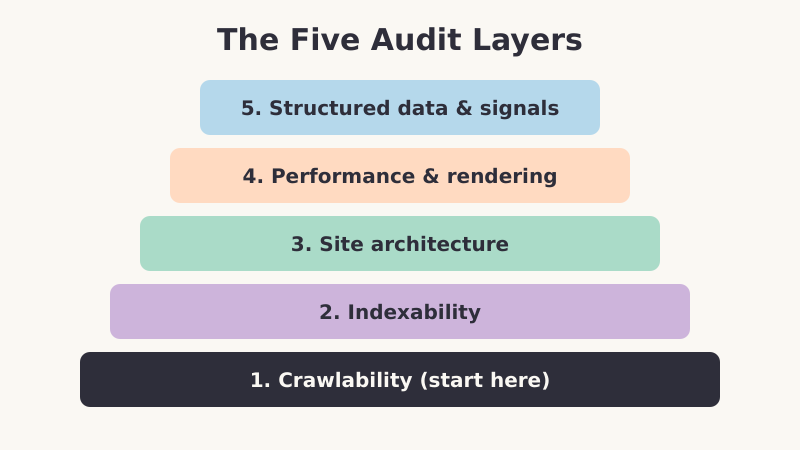
A complete audit spans five layers. Each layer builds on the one below it, which is why the order matters.
- Crawlability — can bots discover your URLs at all?
- Indexability — once crawled, are pages eligible to appear in results?
- Site architecture — is link equity flowing to your important pages?
- Performance and rendering — does the page load and render correctly?
- Structured data and signals — do you give engines the context they need?
Layer 1: Crawlability Checks
If a search bot cannot crawl a page, nothing downstream matters. Start here, always. The first time I audited a B2B SaaS site that had “mysteriously” lost half its organic pages, the culprit was a single line in their robots.txt that had been pushed live with a staging rule still attached. Five minutes to find, one line to fix, weeks to recover.
- Check robots.txt — open
yoursite.com/robots.txtand confirm you are not accidentally blocking important directories. A blanketDisallow: /is the nightmare scenario - Review the XML sitemap — it should list only canonical, indexable URLs that return a 200 status. No redirects, no 404s, no
noindexpages - Find orphan pages — pages with zero internal links are hard for crawlers to discover. Cross-reference your sitemap against pages that have inbound internal links
- Audit crawl budget waste — faceted navigation, session IDs, and infinite calendar pages can burn crawl budget on junk URLs that should never be indexed
Pro Tip: Use the URL Inspection tool in Google Search Console on a sample of your most important pages. It tells you exactly how Google sees the page — whether it was crawled, when, and whether anything blocked it. This is the single most underused diagnostic available to you, and it is free.
Layer 2: Indexability Checks
A page can be perfectly crawlable and still be excluded from the index. Indexability problems are sneaky because the page looks fine to a human visitor. The signals that exclude it live in the HTML head or HTTP headers, invisible unless you look.
- Meta robots tags — scan for
noindexdirectives on pages that should rank. These often get left behind after a site migration or a staging push - Canonical tags — every page should declare a canonical URL. Watch for pages canonicalising to the wrong URL, or to a page that itself is non-canonical
- HTTP status codes — important pages must return 200. Audit for soft 404s, where a page returns 200 but shows “not found” content
- Duplicate content — parameter URLs, HTTP vs HTTPS, www vs non-www, and trailing-slash variants can all create duplicates that split ranking signals
The Redirect Audit Nobody Wants to Do
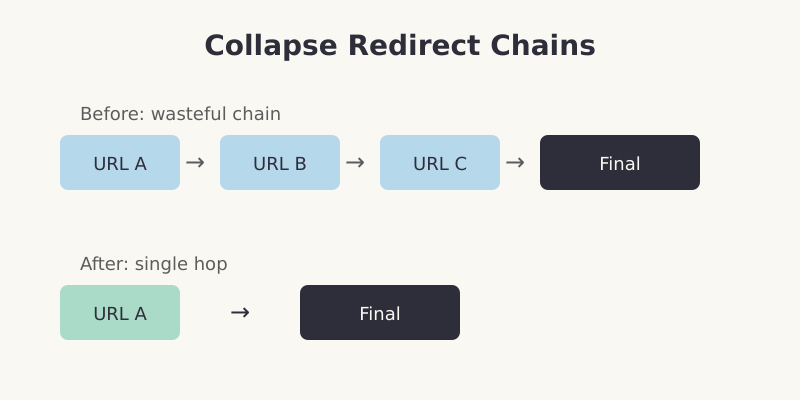
Redirect chains are the dental flossing of technical SEO — everyone knows they should do it, almost nobody does. A redirect chain (URL A → B → C → final) wastes crawl budget and dilutes link equity at each hop. On one audit I found a chain seven redirects deep, a relic of three separate site migrations. Map every redirect, and make sure each one points directly to its final destination in a single hop.
Layer 3: Site Architecture and Internal Linking
Your site structure decides how authority flows from your homepage to your money pages. A flat, logical architecture lets link equity reach deep pages in two or three clicks. A tangled one strands your best content five clicks deep where neither users nor bots bother to go.
- Click depth — every important page should be reachable within three clicks of the homepage
- Internal link distribution — your highest-value pages should receive the most internal links. Surprisingly often, they receive the fewest
- Anchor text — descriptive, varied anchors help engines understand what the linked page is about. Avoid “click here” everywhere
- Breadcrumbs — they reinforce hierarchy for both users and crawlers, and they earn breadcrumb rich results
When I restructured the internal linking on a content-heavy site so that its pillar pages received links from every related article, those pillars gained an average of four ranking positions within two months — with no new backlinks and no content changes. Architecture alone moved the needle.
Layer 4: Performance and Rendering
Speed and rendering sit at the boundary between technical SEO and user experience. Google’s Core Web Vitals formalised this — page experience is a confirmed ranking signal, and a slow, layout-shifting page frustrates users regardless of rankings.
- Render check — confirm that critical content appears in the rendered HTML, not just after JavaScript executes. Heavy client-side rendering can hide content from crawlers
- Mobile usability — with mobile-first indexing, the mobile version of your page is the version that gets indexed. Tap targets, viewport, and font sizes all matter
- Core Web Vitals — measure Largest Contentful Paint, Interaction to Next Paint, and Cumulative Layout Shift on real pages, not just the homepage
- HTTPS and security — confirm a valid certificate, no mixed-content warnings, and HSTS where appropriate
Layer 5: Structured Data and Signals
The final layer is about giving search engines explicit context. This is where schema markup earns its keep, turning plain listings into rich results that command more clicks.
- Structured data validation — test your schema with Google’s Rich Results Test. Invalid markup earns no rich results and can trigger warnings
- hreflang — if you serve multiple languages or regions, confirm your hreflang annotations are reciprocal and reference valid URLs
- Open Graph and metadata — clean titles and descriptions improve click-through from both search and social
- Log file analysis — for larger sites, server logs reveal exactly how bots crawl your site and where they waste time
How Often to Run a Technical SEO Audit
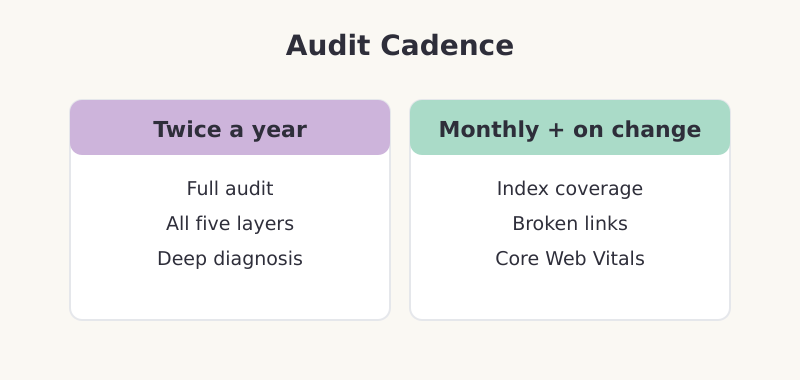
For most sites, a full audit twice a year is enough, with a lighter monthly check on the high-risk items: index coverage, broken links, and Core Web Vitals. The exception is any time you ship a significant change — a redesign, a platform migration, a major content restructure. Those are exactly the moments technical issues creep in, so audit immediately afterward.
Common Mistakes to Avoid
- Auditing only the homepage — the homepage is usually the healthiest page on the site. Sample templates: a category page, a product page, a blog post, and a deep page
- Fixing symptoms, not causes — if you keep finding the same broken redirect type, fix the CMS rule that creates it, not each instance
- Ignoring the staging environment — block staging from indexing with authentication, not just
robots.txt, which bots can ignore - Skipping verification — after fixing an issue, re-inspect the URL to confirm the fix actually took effect
Frequently Asked Questions
What is the difference between a technical SEO audit and an on-page audit?
A technical SEO audit checks whether search engines can crawl, index, and render your pages — issues like robots.txt rules, redirects, and site speed. An on-page audit evaluates the content itself: keyword targeting, headings, internal links, and readability. You need both, but technical issues take priority because they can block content from ranking at all.
Do I need expensive tools to run a technical SEO audit?
No. Google Search Console and the URL Inspection tool cover most indexability and crawlability checks for free. A free crawler can map your site structure and find broken links. Paid crawlers speed up large audits and add depth, but a small site can be audited thoroughly with free tools and patience.
How long does a technical SEO audit take?
For a small site of a few hundred pages, a thorough audit takes a focused day. Larger sites with complex architecture, faceted navigation, or multiple languages can take a week or more, especially if log file analysis is involved. The fixes usually take longer than the diagnosis, so budget time for implementation too.
Will fixing technical SEO issues guarantee higher rankings?
Not directly. Technical SEO removes the barriers that prevent ranking — it does not create ranking on its own. Think of it as clearing the road. Once crawlability and indexability are solid, your content and links determine how high you rank. Fixing a critical issue like an accidental noindex can produce dramatic recovery, but routine fixes deliver steadier, compounding gains.
Key Takeaways
A technical SEO audit is preventative maintenance for your organic traffic. Work the five layers in order — crawlability, indexability, architecture, performance, signals — and you will catch the issues that cost the most before they compound. Audit twice a year, after every major change, and verify your fixes. The unglamorous work of keeping your site technically sound is what lets all your other SEO effort pay off.